Set up Rust Script
- Windows 10 / 11
- About 5 minutes
- Licence key needed
Both come straight from Microsoft. If an installer offers Repair, choose it.
Restart required. Restart Windows after both installs before moving on.
Windows Security sometimes quarantines newly downloaded software. Check Protection history for a blocked WipeReady file.
- 1Open Windows Security from the Start menu.
- 2Choose Virus & threat protection, then Protection history.
- 3If a WipeReady file was quarantined, restore it and add only its folder as an exclusion.
Only from the official link. Only restore files you downloaded from the button in this guide.
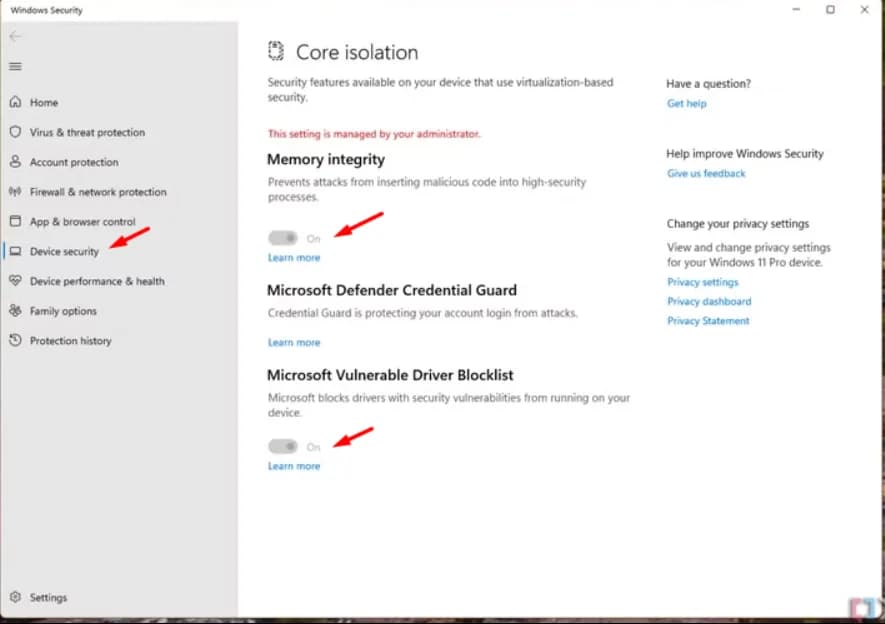
Memory Integrity must be off for the driver to start. Windows needs a restart after you change it.
- 1Search Windows for Core isolation and open it.
- 2Turn Memory integrity off.
- 3Turn Microsoft Vulnerable Driver Blocklist off.
- 4Restart your PC.
Other low-level drivers can block WipeReady. Fully exit or uninstall these first:
- Riot VanguardExit it from the system tray, or uninstall it.
- FACEIT Anti-CheatClose the service, or uninstall FACEIT.
Restart after removing. Restart Windows so the other driver is fully unloaded.
Latest release
WipeReady Loader
Download and extract the archive, then right-click the loader, choose Run as administrator and enter your licence key.
Download loaderKeep this page open. If you see an error, the fixes below cover the common ones.
Something not working?
Start here. Most problems take under a minute to fix.
The loader closes as soon as I open it
This is usually the Windows clock. Open Settings → Time & language → Date & time, turn on Set time automatically, then press Sync now.
See the full fixI see “A driver cannot load on this device”
Make sure Memory Integrity is off, remove any conflicting anti-cheat, and restart your PC.
See the full fixThe loader shows a connection or authorization error
Check your internet connection, make sure your Windows clock is synced, and try again. If it keeps happening, send us a screenshot on Discord.
See the full fixThe recoil control feels too strong or too weak
Check that your FOV, sensitivity, ADS sensitivity, DPI and crouch/ADS modes match the values in WipeReady. Small differences change the result a lot.
The script isn't working in game
Unplug your mouse and plug it back in.
See the full fix